Book your demo
ScriptRunner Connect logo consisting of a pink circle with a white letter C inside
Data center icon
Data Center
Cloud icon
Cloud
Server icon
Server
ScriptRunner Connect glyph: white outline of the letter C, with connecting dots, inside a pink circle

The integration platform for Jira and more!

Bring efficiency and alignment to teams by securely integrating cloud and legacy apps in a central platform, combining the precision of advanced coding capabilities with the speed of an AI-assisted environment and simplicity of working in your own IDE.
Illustration of a person in a yellow T‑shirt smiling with their eyes closed and raising both arms in celebration in front of a stylised ScriptRunner Connect interface. The background window shows colourful icons, including a rocket and a large plug, with decorative stars and circles, suggesting successful integrations.

AWS Partner | AWS Qualified Software

Built on AWS and validated through the AWS Foundational Technical Review (FTR), ensuring security, reliability, and enterprise-ready architecture.
Logo with the words AWS Partner
Logo with the words AWS Qualified Software
Logo stating 'available in AWS Marketplace'

The solution to all your Atlassian integration challenges

Built by the teams behind ScriptRunner with 40,000 installations worldwide, ScriptRunner Connect allows you to integrate all of your Atlassian apps with other popular and bespoke apps all in one single platform. An assisted coding environment helps you get started quickly and gives you the tools to overcome the most complex integration challenges.

A unique approach to integrating apps

No-code integration tools claim to solve all your challenges, but their reliance on predefined logic and limited connectors means that functionality is inherently restricted - like baking a cake with only a handful of ingredients!

Code block style text within a ScriptRunner panel

The flexibility of code

... versus no-code alternatives
Solve the most complex integration challenges by using the power of JavaScript, APIs and webhooks to automate workflows for more efficiency, sync data between apps for team alignment and migrate data to a new app or instance for business continuity.
Icon of colourful circles connected to a larger central circle by radiating lines

Connect any app to any app

... versus single use case alternatives
Integrate Jira, Confluence, ServiceNow, monday.com, Zendesk, Salesforce, Azure DevOps, GitLab, GitHub, Microsoft 365, Google Drive, Google Sheets, Google Calendar, Slack, and more… or connect to any app that has a web-based REST API for near unlimited scale.
Multicoloured bar graph icon

Usage-based pricing

... versus user-based pricing alternatives
Pricing is based on the number of connectors, rather than the number of users, ensuring costs remain proportional to the number of connected apps, offering cost-effectiveness from day one, and a transparent way to scale as your requirements grow.

The only approach to integrating apps!

Try a code-based integration platform that gives you flexibility, scale and cost-effectiveness no matter how complex your use cases - like baking a cake with all the ingredients you need… for less money!

A revolution in service delivery reporting

Discover how Adaptavist Managed Services saved over £90,000 annually by connecting Jira and monday.com using ScriptRunner Connect.


Get started in three steps

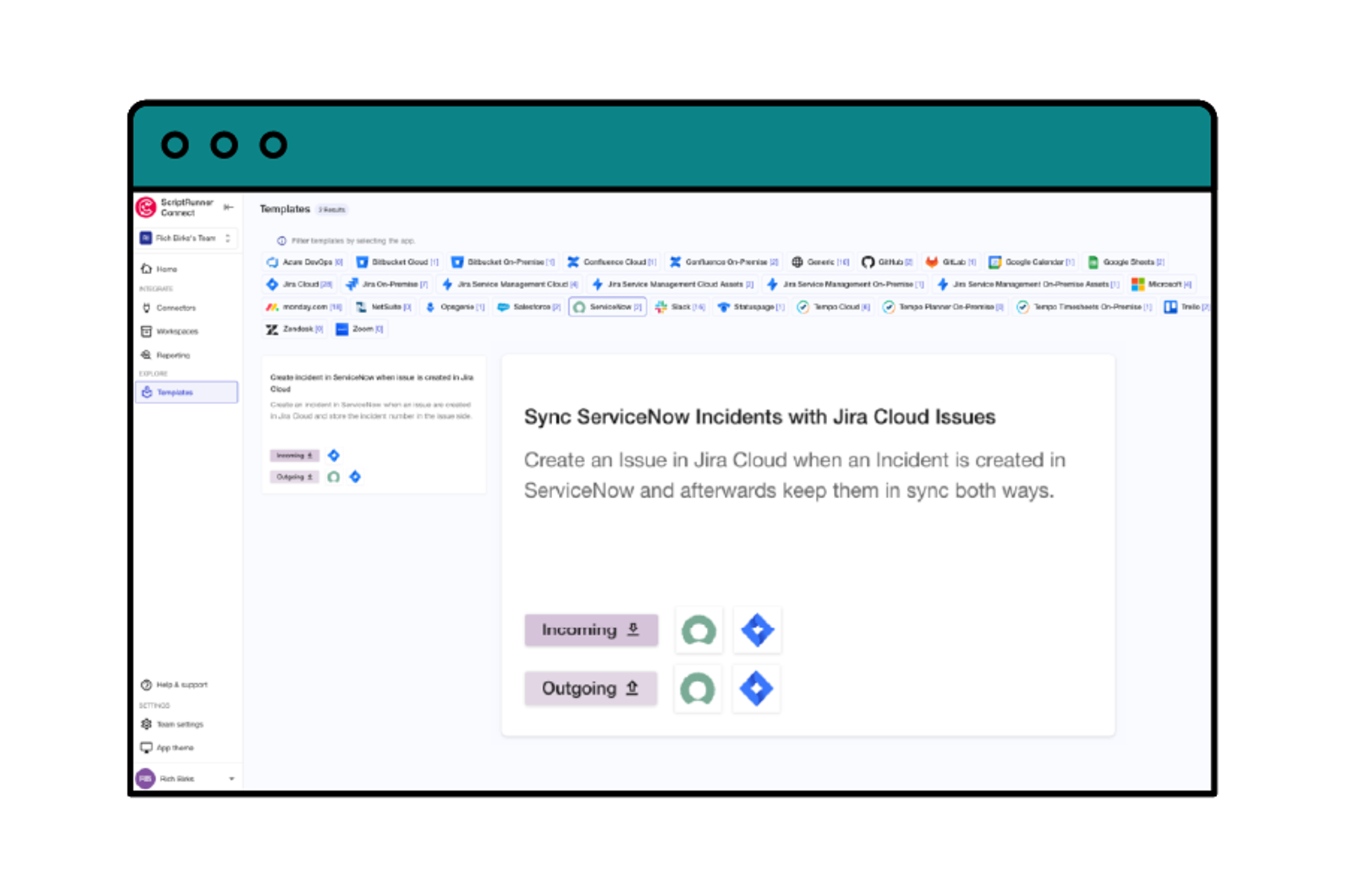
Step 1: Choose a template

Accelerate integrations with pre-built templates for common automation, synchronisation, and migration use cases
  • Speed up integration setup: a template is a selection of specific Connections, Event Listeners, and pre-written code packaged to solve a specific use case.
  • Explore integration possibilities: Choose from 80+ templates that offer practical examples of how to solve real-business problems. Use the AI Assistant to adjust the template to your exact use case.
A screenshot of the templates feature in ScriptRunner Connect showing a Sync ServiceNow Incidents with Jira Cloud Issues template

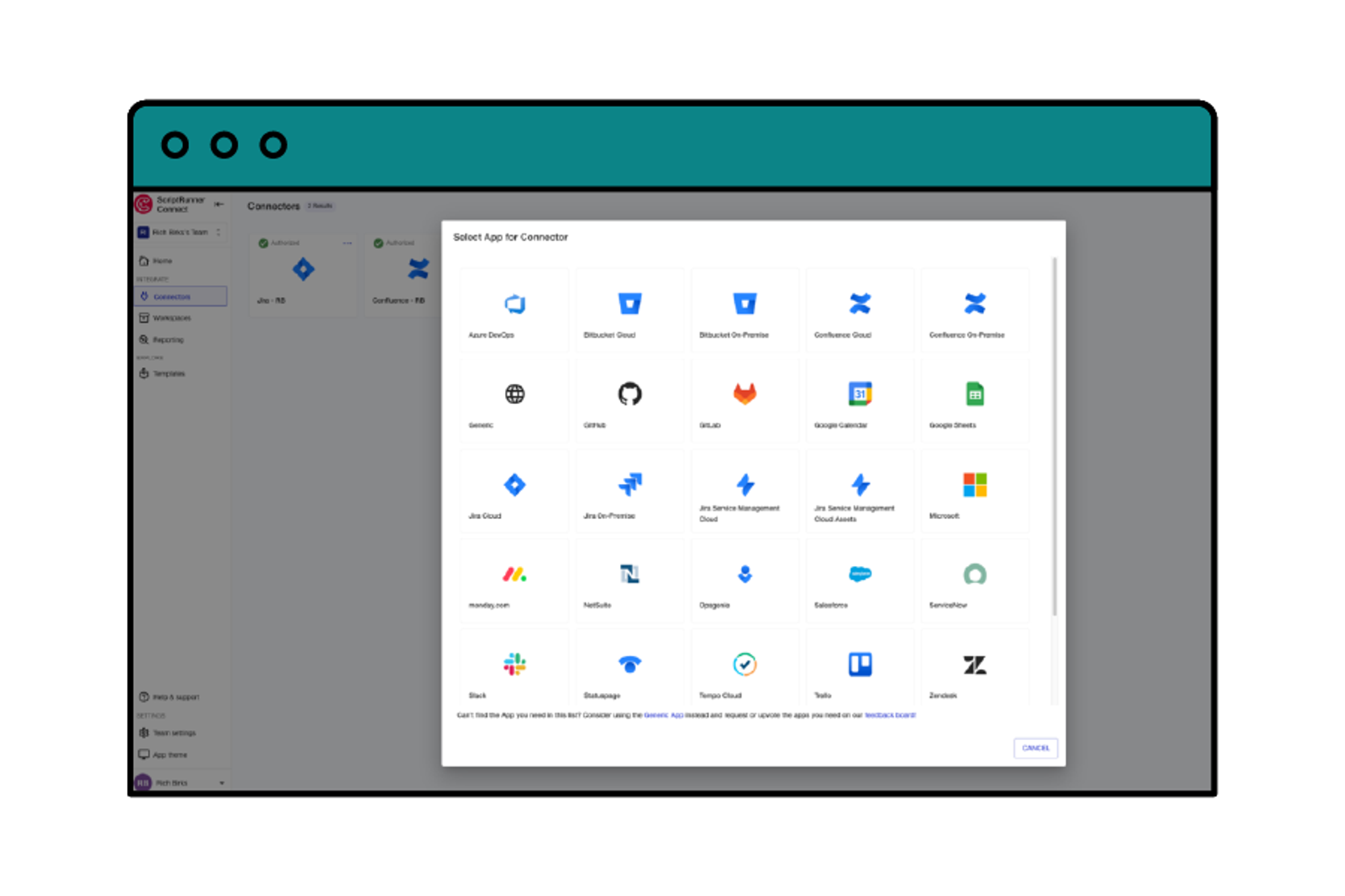
Step 2: Connect your apps

Automate the authentication process between apps and listen to key events within your app landscape
  • Enjoy near unlimited scale: Choose from 30+ pre-built connectors for a continued connection or connect to any app that has a web-based REST API.
  • Define your events: Use webhooks to set up event-based triggers that initiate a predefined action or workflow to make changes in your ecosystem.
A screenshot of the connectors feature in ScriptRunner Connect showing available managed connectors and the generic connector

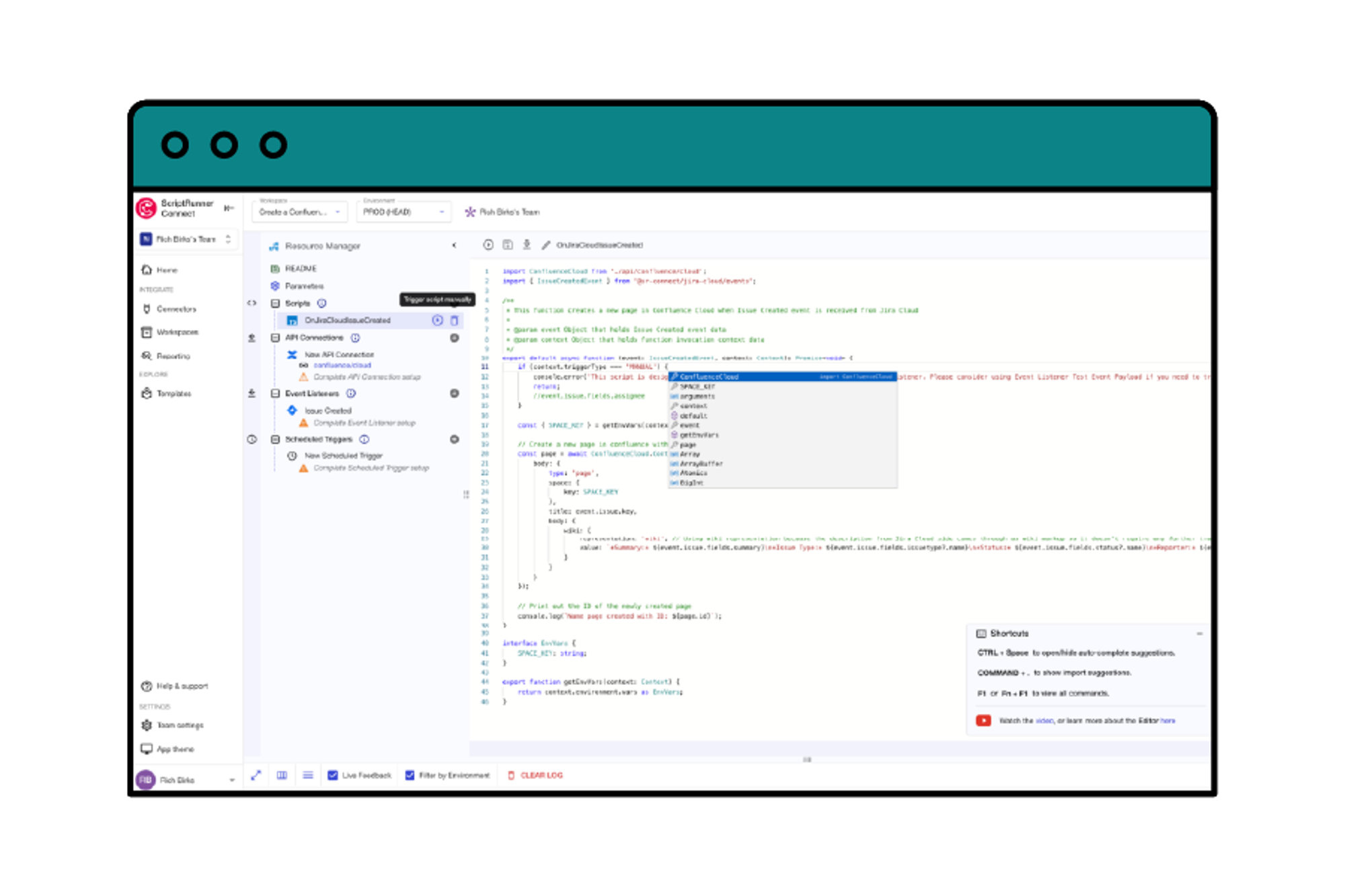
Step 3: Run your integration!

Update your template to reflect the exact business requirement and set the script execution frequency
  • Define your business logic: Set the rules, steps, and data mapping through our parameters control panel or directly in your scripts to achieve your specific goal.
  • Select the frequency and run: Choose from scheduled triggers in Cron format or manually trigger a script directly in the code editor.
A screenshot of the code editor feature in ScriptRunner Connect showing available managed API functionality and the capability to trigger scripts manually

Key features

ScriptRunner Connect is filled with rich features to help you and teams like yours build custom integrations using advanced coding capabilities out of the box.
Pink scripting code block icon with two yellow sparkles above it

Remote workspace (NEW)

Build and manage integrations from your own development environment.
Learn more
Grey cloud icon with a teal cog alongside it

Private cloud hosting

Run ScriptRunner Connect in your isolated AWS environment for maximum security.
Learn more
Icon of a computer monitor and table lamp

Workspaces

Use workspaces for building, managing, and collaborating on your integrations.
Learn more
Icon of a browser window with a book outline inside it

Templates

Kickstart integrations with pre-built templates for common automation, synchronisation, and migration use cases.
Learn more
Icon of a plug and socket inside a grey cog

Connectors

Manage integrations with pre-built Connectors and a Generic Connector for secure and automated authentication.
Learn more
Icon of a grey cog over a teal cloud

Managed APIs

Making coding easier for an awesome developer experience.
Learn more
Icon of a person wearing a headset

AI assistant

Generate scripts, learn the product's full capabilities and find relevant out-of-the-box use case templates.
Learn more
Icon of three smiling people

Teams

Collaborate in shared workspaces to align on integrations for a faster time-to-value.
Learn more
Icon of a calendar with a clock outline inside it

Custom triggers

Choose from event-based triggers, time-based scheduled triggers or manually triggering an integration script.
Learn more
Icon of a pink cog inside a teal shield

Security

Rely on the expertise and security-first credentials of the teams behind ScriptRunner.
Learn more
Icon of three colourful stars

US data residency

AWS-powered infrastructure for enterprise-grade security, compliance and performance.
Learn more

From a legacy system to monday.com

Discover how Adaptavist and ScriptRunner Connect helped NYU Silver School of Social Work transform data management for 900 students each semester.

Backed by enterprise-grade compliance

We're proud of our credentials around data security, privacy, and stability.
Icon of a pink cog inside a teal shield

ISO 27001 certified

We're ISO 27001 accredited across the entire ScriptRunner suite, denoting excellence in data security.
Learn more
Icon of a pink cog inside a teal shield

SOC 2 Type 2 report

A SOC 2 Type 2 audit report is available, which covers our handling of organisational and customer data.
Learn more
Icon of a pink cog inside a teal shield

Quality assurance

We employ a multitude of security measures to detect incidents and we participate in Atlassian's Bug Bounty program.
Learn more
You can also see more information about credentials across the ScriptRunner suite in our security overview page.

What our customers have to say

Kyle Moseley profile image
We proposed ScriptRunner Connect, as it offered greater flexibility, enhanced functionality, and a more cost-effective approach compared with no-code alternatives. With ScriptRunner Connect, we’re only limited by what we can develop and not at the mercy of an external product’s development team.
Kyle Moseley
CEO of Blue Ridge Consultants
Kyle's team of Atlassian consultants, in partnership with Sherpa Solutions, delivered outstanding efficiency gains for Boosey & Hawkes, the world’s largest specialist classical music publishing company
Two overlapping speech bubble icons, one pink and one teal, with a yellow spark on the upper bubble
"ScriptRunner Connect has streamlined our workflows and saved us valuable time and resources, and we’re looking to further expand on this cohesive relationship in the coming months to unlock even greater efficiencies."
Bevis Hungate, VP, Boosey & Hawkes
Two overlapping speech bubble icons, one pink and one teal, with a yellow spark on the upper bubble
We used Tempo Worklog Migrations by ScriptRunner Connect for our Cloud-to-Cloud migration, and it was a lifesaver. With 40-50K worklogs spanning over a year, this app made the process smooth and efficient. Without it, manually transferring such a large volume of data would have been a nightmare.
Ugnius Aušra, Customer Support Manager / Jira Admin, Athera Technologies
Two overlapping speech bubble icons, one pink and one teal, with a yellow spark on the upper bubble
"We found we could easily authenticate with and manage multiple Google Calendars. We used the Managed API library to interact with Google Calendars themselves, which allowed us to spend more time testing our process instead of learning the specifics of the Google Calendar API calls."
Kyle Moseley, CEO, Blue Ridge Consultants
Two overlapping speech bubble icons, one pink and one teal, with a yellow spark on the upper bubble
"Thanks for the nice perk, and the great software - I'm actually enjoying setting up an integration this time (must be the first time for me that it's fun to do), and a big shoutout to the support team, super responsive and helpful!"
Joachim Bollen, Business Consultant, Idalko
Two overlapping speech bubble icons, one pink and one teal, with a yellow spark on the upper bubble
"We used ScriptRunner Connect to migrate Tempo worklogs from one cloud instance to another. We found it really easy to use. Our client couldn’t be happier with the result."
Nathan Ellis, Principal Atlassian Consultant, Contegix
Two overlapping speech bubble icons, one pink and one teal, with a yellow spark on the upper bubble
"I'm truly impressed by the app's capability to seamlessly integrate with multiple applications and swift set up."
Dave Kleihorst, Atlassian Consultant, Prepend
Two overlapping speech bubble icons, one pink and one teal, with a yellow spark on the upper bubble
"ScriptRunner Connect allows us to solve complex Atlassian integration challenges that were previously theoretically possible, but never cost-effective solutions."
Walter Buggenhout, Atlassian Expert, ACA IT
Christopher Wilkie profile image
For us, the app has been hugely beneficial streamlining a workflow that has been causing friction in our business for a long time.
Christopher Wilkie
Managing Director of CHH Group
Christopher's team automate automotive excellence via monday.com using ScriptRunner Connect.

Tailored for specific roles

Data center icon with a cog in the top right

System Admins

Upgrade from a decentralised approach to integrating apps that brings complexity, inefficiency, and a continuous learning curve.
Learn more
Icon of a wrench and cog

Developers

Don't settle for cookie-cutter solutions that can't keep up with your technical know-how or complex business requirements.
Learn more
Icon of a person's head side-on with a grey cog behind

Consultants

Discover the advantages of an integration platform built for consultants and 99% of client requirements.
Learn more

Most popular use cases

Process map icon with coloured blocks connected by branching black lines

Workflow automation

Create a repeatable process to automate manual tasks across your entire system landscape.
Central pink circle connected to and surrounded by several smaller teal circles

Data synchronisation

Create a repeatable process to ensure the same data resides in two or more locations across Atlassian or third-party apps.
Icon of two map marker pins connected by a pink dotted line

Data migration

Create a one-off process to transfer data between Atlassian and Atlassian or third-party apps.

Want to see ScriptRunner Connect in action?

Tell us a bit about your favourite apps and use cases, and our Customer Success team will provide a tailored demo for you and answer any questions you may have.