ScriptRunner Cloud Migration Hub

All the resources you need to migrate your ScriptRunner apps to Cloud.
A person holds up a magnifying glass
We know that migrating an app like ScriptRunner can be daunting, so whether you're a consultant, a solution provider, or a Jira admin, we've pulled together all our best resources to lighten the load.
Need to understand the differences between ScriptRunner for Jira Data Center and ScriptRunner for Jira Cloud? We've got you.
Want more insight into the complexity of a migration project? Or how about some Cloud product training? We'll cover all that too.
In this hub, we've assembled FAQs, case studies, videos, the works. And if you have a question we haven't answered, let us know and we'll try our best. We're here to help.
Notepad and pencil icon

Step one: Planning a migration


Migration is a significant step in any business's digital journey, and with many established workflows and essential apps on your Data Center instance, you want to know that a new Cloud environment can still offer those automations and customisations that make your work life easier.

What are the benefits of ScriptRunner for Atlassian Cloud products?

Here's why ScriptRunner on Cloud is a smart move:
  • Go beyond the native automation capabilities of Jira and Confluence Cloud. ScriptRunner has always been about pushing the boundaries of what's possible in your tools, giving you more flexibility and more control. On Cloud, our mission remains the same—when you reach the limits of out-of-the-box features, ScriptRunner unlocks more.
  • Harness the power of HAPI on Cloud. HAPI, your speedy coding companion, is available in both ScriptRunner for Jira Cloud and ScriptRunner for Confluence Cloud. Improvements and updates to HAPI are accelerated in our Cloud products, so you'll get access to every helpful new feature as it arrives.
  • Keep your tasks on track with Enhanced Search for Jira. Map your most complex projects, find exactly what you need when you need it, and get deeper insights for reporting that just aren't possible with native JQL alone.
  • Get more of the latest innovations from ScriptRunner Leap. If you're always the first to try something shiny and new, you'll love ScriptRunner Leap. Exclusively on Cloud, you can opt in to test the latest tools and features before anyone else—and the best ones, based on your feedback, often stay for good!
  • Have your say. ScriptRunner for Jira Cloud and ScriptRunner for Confluence Cloud both make use of open feature request boards, where you can suggest new features and vote on others' suggestions to inform future product development.
Still have questions? Check out the resources below for more in-depth information about migrating with ScriptRunner and what you can expect on Cloud.

Resources we recommend

An icon showing a brain and a pink cogwheel joined in the middle
Platform differences
Start here to understand the fundamental differences between the Data Center and Cloud versions of ScriptRunner for Jira and ScriptRunner for Confluence.
Teal star icon with tick mark
ScriptRunner for Jira Cloud features
Compare functionality on Data Center versus Cloud in ScriptRunner for Jira.
Compare ScriptRunner for Jira Data Center and Cloud features
Pink star icon with tick mark
ScriptRunner for Confluence Cloud features
Compare functionality on Data Center versus Cloud in ScriptRunner for Confluence.
Compare ScriptRunner for Confluence Data Center and Cloud features
A teal shield icon with a cloud inside it
Trust and security
Learn more about the rigorous standards for security across ScriptRunner Cloud products.
Explore ScriptRunner's security credentials
A stylised icon representing a list of items, with yellow stars as bullet points
Migration cheat sheet
Get an overview of how certain ScriptRunner for Jira features may translate from Data Center to Cloud as part of your migration planning.
View the cheat sheet

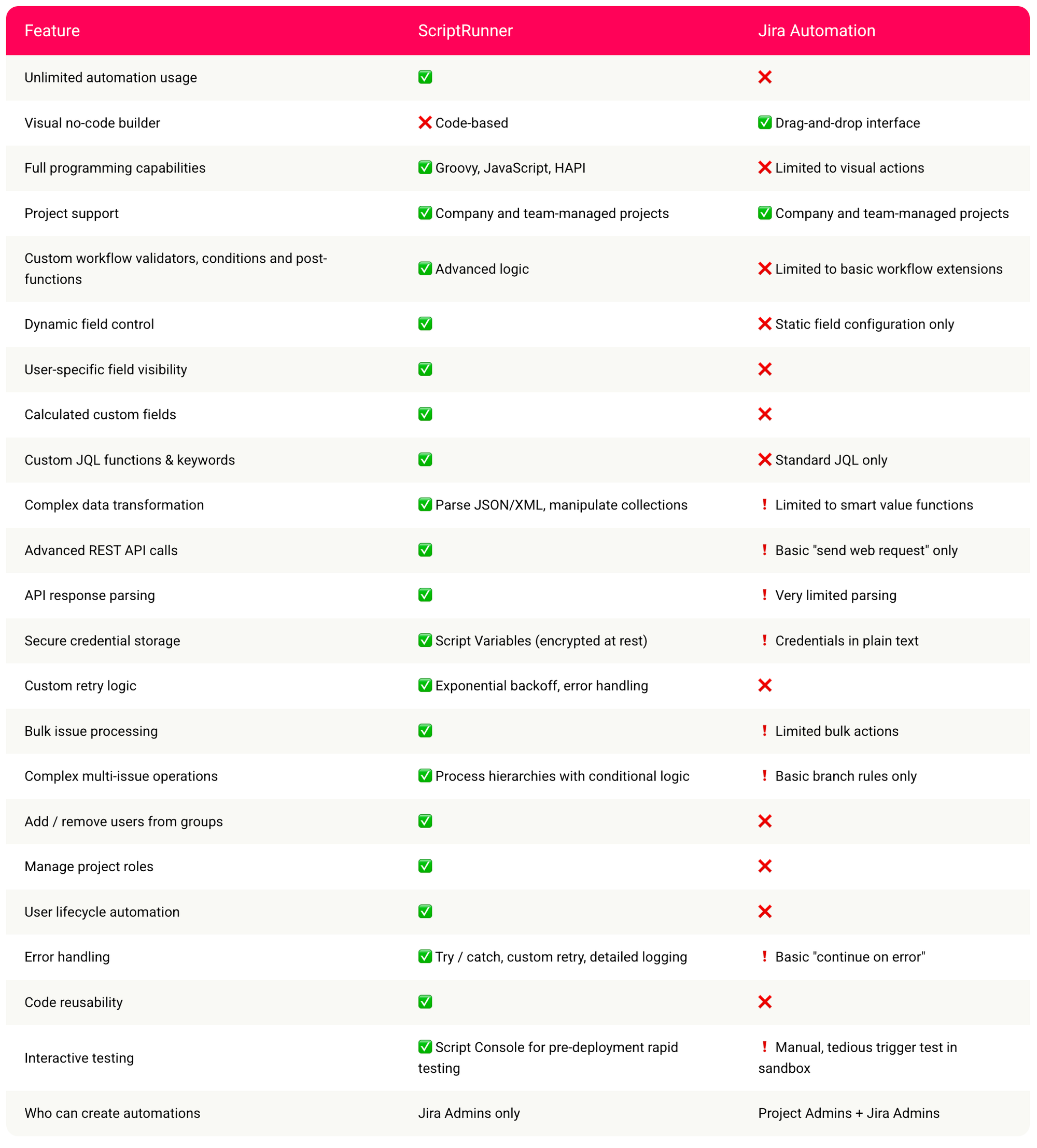
Jira Automation vs ScriptRunner for Jira Cloud

Jira Automation is great for simple workflows, but when drag‑and‑drop rules are too restrictive, or you hit the native automation limit for your instance, ScriptRunner is the solution.
ScriptRunner delivers enterprise‑grade automation: dynamic field behaviour, pre‑transition validation, enhanced search and JQL functions, bulk operations, and resilient REST integrations. Explore more to find out how ScriptRunner gives you automation power beyond what Jira Cloud has to offer.

A table comparing the features of ScriptRunner with those of native Jira Automation. For the full table, follow the 'See where ScriptRunner excels' link button.
Click table to enlarge

Need some help?

Our Customer Success team is here to answer questions, walk you through Cloud product features, support with tricky use cases, or direct you to further resources and help if needed.
Icon of a smiling face wearing a headset
Pink circle with arrow icon inside

Step two: Migrating

Know before you go

Here are some things you should know before embarking on your migration journey.
ScriptRunner is cloud-ready.
There are ScriptRunner apps available for both Jira and Confluence Cloud.
Your on-prem scripts will need updating.
Data Center and Server scripts don't automatically work on Cloud, so will need to be re-written for the Cloud REST API.
It's a good time to take stock.
First, we recommend doing a thorough analysis and clean-up of your existing on-prem scripts. This will reduce the effort required in migrating redundant, duplicate, or inactive scripts.
Next, for necessary scripts, establish what action they are performing and consider merging similar scripts into a single, more efficient script where possible.
There are tools that can help you.
You can use the Script Registry in ScriptRunner for Jira and Confluence Server/Data Center to:
• View all your scripts in one place.
• Get helpful information about scripts' usage so you can prioritise them for migration.
• Export all your scripts, configurations, and custom fields in one easy step.
You'll also find that scripts written with HAPI on Data Center are much simpler to migrate, and Atlassian's Jira Cloud Migration Assistant (JCMA) can help migrate a few of ScriptRunner's features. However, migrated scripts using JCMA will still need to be rewritten before they will function on Cloud.
Two speech bubbles, one with a spark inside it

Must-have tools for your ScriptRunner migration

The ScriptRunner Migration Suite helps simplify and speed up every step of your Jira migration journey.

Top tip

In most cases, rather than trying to create a like-for-like script, you'll get better results by reviewing the purpose of the script and then recreating it using Cloud functionality.
Lightbulb icon

Migration guides

Explore more resources and information in these product-specific migration guides.
Icon of a book inside a computer window

Migration checklists

Follow a comprehensive step-by-step checklist to make sure you've covered all the bases.
An icon representing a list of three items. The first two have pink circles with tick marks next to them, and the third has an empty teal blue circle, as though it has not yet been completed.

Try it out for free

Get a 30-day trial of ScriptRunner for Jira Cloud and ScriptRunner for Confluence Cloud to start your migration journey free of charge.
Teal cloud icon

Step three: Welcome to Cloud! What's next?

Getting started

Take a look around your new Cloud environment with resources you can follow at your own pace. Whether you need a quick overview or a deep dive into specific ScriptRunner features, these pages have you covered.

Finding your bearings

If you're a seasoned Jira user, you may have noticed that things look a little different in Jira Cloud! For those missing the familiarity of the on-prem environment, here are five workarounds that can make you feel more at home.
A magnifying glass with a question mark inside it, alongside a teal speech bubble with a light bulb inside it

Looking for inspiration?

You can do so much with ScriptRunner, sometimes it's hard to know where to start! Check out these handy tutorials and tips for some popular use cases in Jira and Confluence Cloud.
10 easy Jira Cloud automation wins with ScriptRunner
Here are 10 example scripts for quick wins using ScriptRunner for Jira Cloud.
Read more
How to integrate Confluence data with Jira fields
Learn how to use ScriptRunner to sync data from Confluence tables with Jira through this tutorial and example use case.
Read more
How to move JSM users between organisations in bulk
This step-by-step guide shows you how to move JSM user accounts in bulk, using ScriptRunner for Jira Cloud.
Read more
Mastering backlog management with Enhanced Search queries
Ditch your unwieldy backlog with the help of these 5 advanced JQL functions from ScriptRunner's Enhanced Search.
Read more

Explore other ScriptRunner users' Cloud success stories

Jira and Confluence
Cloud
Jira
Beyond the basics: how Agile Digital Solutions craft complex Jira automation for clients
Founder Ben shared details about how they facilitate working with complex processes and external systems inside Jira, using ScriptRunner to allow for seamless operations management.
Read more
Lines of code listed on a web browser, surrounded by icons such as a lightbulb, a globe and cogs.
Jira
ScriptRunner for Jira
How a government body saves 30 hours per month with ScriptRunner for Jira Cloud
Learn how Ana, an Atlassian consultant at Nimble Evolution, helped a governmental body automate their processes to eliminate human error and save 30 hours per month.
Read more
A person smiles in front of a Jira board, with arrows extending from their fingers pointed upwards. The arrows show the Jira board expanding, surrounded by star icons.
Jira
ScriptRunner for Jira
Advanced Jira Cloud automation: Boost efficiency with ScriptRunner
With the power of ScriptRunner, independent consultant Sana Safai can meet the toughest client challenges head-on, automating any Jira Cloud process and exceeding its native capabilities.
Read more

There's more where that came from

ScriptRunner’s Cloud products are always improving to bring you more new features and new ways to automate, extend, and integrate your tools.
Keep up to date with the latest releases
The Product Updates Hub is your one-stop shop for ScriptRunner news. Keep on top of the latest innovations, updates, and feature releases across ScriptRunner Cloud products here.
Have your say on ScriptRunner's roadmap
Your feedback can shape the future of ScriptRunner! In ScriptRunner for Jira Cloud and ScriptRunner for Confluence Cloud, you can suggest new features, vote on what you'd like to see, and discuss features suggested by other users like you.
Three colourful star icons

Share with the community

As you grow your workflows in your new Cloud environment, the best place to chat about features, get answers from peers and experts, and share tips is on Loop: the community platform for all things ScriptRunner.
Explore the forums today and find a wealth of information from ScriptRunner team members, partners, and users alike.