

Rich Birks
Published on 16 October 2026
ScriptRunner Connect
Use your own AI agent to build on ScriptRunner Connect
You can now streamline your work, building, testing, troubleshooting, and operating in ScriptRunner Connect using your favourite AI coding agents.
If you’re using your favourite AI agents to streamline how you build software, the last thing you want is to be roadblocked by the tools you need to build in.
These AI agents have the potential to save you countless hours, but building a useful integration requires more than just writing the code. It also needs somewhere to run that code, access connected systems, test its work, and understand what happened when something goes wrong.
ScriptRunner Connect now supports that workflow
With our public API, CLI, and new agent skill, AI coding agents can now work directly with ScriptRunner Connect to build, test, troubleshoot, and operate integrations—without a human having to switch between the agent and the ScriptRunner Connect Web UI at every step.
Don’t worry, the platform itself hasn’t changed, and your integrations will still run on ScriptRunner Connect, with the same hosting and security model. Credentials and sensitive administration decisions will still be with you; we’ve just tailored the rest so your AI agents can save you as much time as possible.
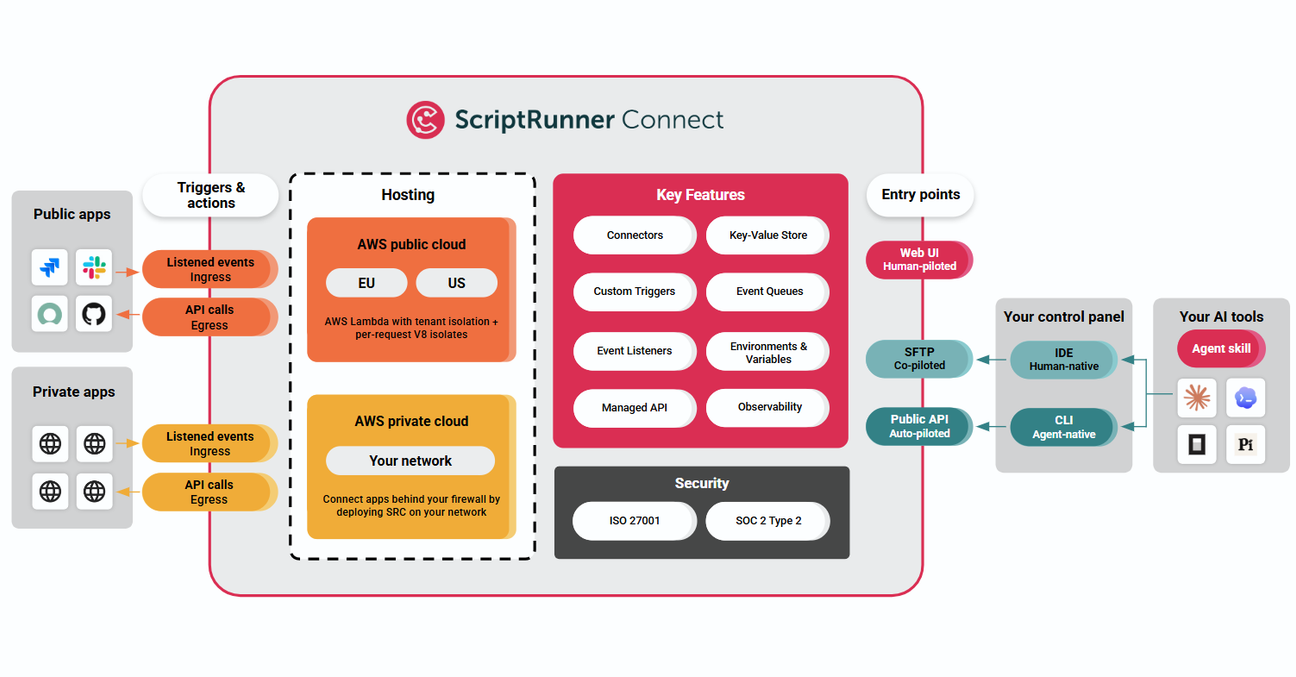
How work enters ScriptRunner Connect: people can work through the Web UI, people and AI agents can use the CLI for local development and execution, and automated workflows can connect directly through the public API.

Two ways AI now supports you
You can already use ScriptRunner Connects AI Assistant to help you parse documentation, explain code, troubleshoot problems and suggest changes.
But there is an important distinction between an AI assistant that helps you work and an AI agent that can do the work.
The difference when using ScriptRunner Connect:
- The AI Assistant can suggest a script, but it can't run that script or verify the result for you.
- An external AI coding agent—such as Claude Code, Codex, OpenCode, or Pi—can now work with ScriptRunner Connect directly using our CLI and agent skill via our public API.
That means an agent can:

Create and manage workspaces
Connect systems and configure integrations

Write TypeScript or JavaScript integration logic
Run scripts against test event payloads

Inspect logs and troubleshoot failures

Evaluate whether systems can be integrated

Optimise existing integrations

Perform one-off operational tasks across connected systems
Create tests and iterate on the implementation
Now that agents can drive a browser for you, they can also perform certain tasks such as configuring connectors and registering webhooks.
The result is a complete development loop:
Understand requirement → Write code → Execute → Inspect output → Iterate
Why code-first matters for AI
There is another benefit to you using ScriptRunner Connect with AI:
Integrations are code.
AI coding agents excel at working with code. They can translate requirements into logic, work with APIs, handle complex data transformations, and reason about runtime errors.
In a visual integration platform, AI must work within a platform-specific graphical abstraction.
In ScriptRunner Connect, the agent works directly with the underlying TypeScript/JavaScript logic. It can write code, interact with APIs, execute the integration, inspect execution feedback, and refine the implementation based on what it finds.
Imagine giving an agent a prompt like:
‘When a Jira issue moves to Done, find the corresponding customer in Salesforce, update their record, calculate the value of the completed work, and notify Slack if it exceeds a threshold.’
The agent turns that prompt into executable logic, runs it against test payloads, inspects the execution logs, refines the code and then asks you to test the integration end-to-end.
The critical difference isn't that AI can't work in other platforms; it's the distance between the AI's intent and the integration logic. With ScriptRunner Connect, that distance is deliberately short.
ScriptRunner Connect becomes more than a platform for manual configuration—it becomes an integration execution environment that AI agents can build, test, troubleshoot, and operate through.

Why not just let the agent call the APIs directly via MCP?
If you've used an AI coding agent with Model Context Protocol (MCP), you might wonder why you'd route an integration through ScriptRunner Connect at all, rather than letting the agent invoke Jira, Salesforce, and Slack directly.
Think of it like the difference between having a master chef cook every meal and having a recipe that you can follow every night. Having the chef there to cook every meal isn't practical or scalable; the recipe captures their expertise once and lets the same meal be prepared repeatedly without them needing to be there.
An agent working directly against APIs through MCP is like having the chef in your kitchen: highly capable and able to reason through what needs to be done as each event occurs. That's powerful, but it means relying on the agent's intelligence at runtime each time the task needs to be performed.
With ScriptRunner Connect, the agent writes the recipe: business logic compiled into reproducible, deterministic code. That code can then be scheduled, triggered, and audited on managed infrastructure, without requiring an LLM agent to reason through the process for every event. This makes the resulting integration repeatable and scalable, while keeping the agent's intelligence focused on understanding the requirement and creating the logic in the first place.
And just as a recipe is more practical and cost-effective than having a master chef cook every meal, running the integration as code is significantly more cost-effective than invoking an LLM agent for every event. The agent's intelligence is used to create the integration once, rather than paying for that reasoning repeatedly every time the integration runs.
MCP is powerful for giving an agent access to external systems. ScriptRunner Connect adds another layer: it lets the agent turn that intelligence into durable integration logic that can run independently of the agent.

From copy-and-paste loops to autonomous iteration
Previously, an AI agent could write integration code, but you had to act as the bridge between the agent and the platform:
- Ask the agent to write the integration.
- Copy the code into ScriptRunner Connect.
- Trigger the script manually.
- Locate the output or error log.
- Copy the log back to the agent.
- Ask the agent to fix the issue.
- Repeat.
With the CLI acting as the agent-native route via the public API, the agent handles that feedback loop itself. It creates the workspace, deploys the script, executes it against test data, reads terminal execution feedback, and modifies the code until the implementation works as expected.
Your role shifts from moving text between browser windows to defining high-level requirements and reviewing execution plans.

What can you ask your AI agent to do?
Once the ScriptRunner Connect skill is installed, you can reference /sr-connect in your prompt:
- "Using /sr-connect, when something happens in system X, do something in system Y."
- "Using /sr-connect, check why my workspace X is failing and fix it if you can."
- "Using /sr-connect, check if system X can be integrated with system Y."
- "Using /sr-connect, show me information A, B, and C from systems X and Y."
You can also ask the agent to create automated tests - using mocked API requests or running live integration tests against sandbox systems.
This opens up a different way of thinking about integration development. Instead of treating AI as a tool for generating snippets of code, you can give it responsibility for a much larger part of the integration development lifecycle.
What's new in ScriptRunner Connect?
Three main capabilities make this agentic workflow possible:
- Public API: Provides programmatic access to platform features, allowing end-to-end management without browser interaction.
- CLI: Gives users and AI agents a terminal-native interface for local workspace management, script execution, and real-time log streaming. The CLI passes requests through the public API.
- Agent Skill: Equips AI agents with the domain context, CLI usage rules, and API knowledge required to interact with ScriptRunner Connect effectively.

Staying in control
Delegating tasks to an AI agent requires clear boundaries, especially when handling production systems.
Restricted operations—Web UI only
To protect platform security, certain tasks require explicit human action in the Web UI:
- Creating teams
- Upgrading subscription plans
- Inviting or removing team members
- Approving Egress Firewall rules
Best practices for agent workflows
- Plan first: Ask your agent to generate an execution plan before performing modifications. Review the plan before allowing it to make production changes.
- Connector authorisation: While browser-capable agents can assist with OAuth setup, we recommend users complete sensitive credential handshakes directly.
- Explicit prompts: Provide clear constraints when working with active workspaces.
The goal isn't to remove people from the process. It's to give agents enough access to do useful work while keeping sensitive administrative decisions and credentials under human control.
Getting started with an Agent
To start working with ScriptRunner Connect via an AI agent, ensure you have Node.js 22+ installed.
1. Install the CLI
npx @sr-connect/cliOr install globally
npm i -g @sr-connect/cli2. Install the Agent Skill
npx skills add https://github.com/adaptavist/scriptrunner-skills --skill sr-connect3. Authenticate
If you installed the CLI globally
sr-connect auth loginOr use
npx @sr-connect/cli auth loginFollow the instructions to generate an API key in ScriptRunner Connect and link your CLI session.
Once authenticated, tag /sr-connect in your agent prompts to start building.

The next way to build integrations
The true value of AI coding agents isn't just writing snippets faster. It's their ability to understand a requirement, implement a solution, execute it in a real runtime, observe the results, and refine the logic autonomously.
For integrations, this requires a dedicated execution environment built for both humans and agents.
That's what you have with ScriptRunner Connect.
Code-first. API-powered. Agent-ready.
Ready to get started?
Already using ScriptRunner Connect? Learn how to set up the CLI and agent skill and start working with AI agents.
If you’re new to ScriptRunner Connect, sign up for a 30-day free trial and explore the platform for yourself.
If you’re new to ScriptRunner Connect, sign up for a 30-day free trial and explore the platform for yourself.
Was this helpful?